This was originally written as a post on Keyboard Warriors, as a beginner recording tutorial.
Tips for getting good vocals for submitting to KBW
Main points
- A $5 mic is bad, but anything better is fine. Smart phone or better mic.
- Try to minimise background noise, especially resonance and reverb.
- Speak clear and consistent.
- A few FXs can make your vox pop.
What mic do I need?
Your phone microphone is probably good enough, on any smart phone in the last 10 years. Especially with some post-recording editing. But then you have to transfer the audio to a laptop to get the timing right to submit.
But it's easier to record straight into Audacity or a DAW, so you don't have to worry about the audio lining up, and most laptop microphones are not great, so options:
-
Get a lapel mic that you can plug straight into you laptop. Need to make sure it has the right connection - TRRS jack on modern laptops. You can probably also find USB ones.
-
Get an audio interface and any XLR/6.5mm jack microphone. A cheap dynamic XLR mic and cheap interface from a well known brand is probably around three hundred bucks, or cheaper if you go second hand.
-
Get a digital audio recorder. There are a few of these around for about $200 new, and they sounds great. Using one with a "class compliant" USB interface in it means that you can use it to record directly into your laptop over USB. But you can also record when you're away from your laptop, unlike an interface.
Any of these options will get you 95%+ of the audio quality you need.
Mic placement
This depends a little on what kind of mic you have, but mostly the idea is to get close, but avoid spitting directly into the mic, as plosive sounds (p, b, etc) will create pop sounds that are annoying to remove. If you rap across the front of the mic at about 45°, you will reduce this. A pop filter and/or wind shield can help too.
Many mics pick up handling noise too, so it can be good to get a mic stand or something to hold it near where your mouth will be. Some digital recorders have camera tripod mounts, so a cheap tripod can help.
Room treatment
This is really important to get nice clean sounding vocals. Mainly you want to minimise reverb and resonances.
The best way to figure this out is to learn what to listen for. To do this, go outside, and clap, and listen to the clap. Now go in your bathroom, and clap again. You should be able to hear a quick reverb afterwards. Now try the same thing in your recording space. It will probably be less intense, but still there. You want to get rid of that, it makes recordings muddy and hard to work with. People spend thousands on this, but you don't need to.
The easiest way to do this is to isolate the mic. You can get cheap reflection filter for $50ish on ebay. But you can also just make one out of a cardboard box and some foam, a pillow, a towel or something similar. The main thing is that you voice hits the wall, and then it doesn't hit the wall behind, reducing echos. As @bloodsporks mentions below, putting your mic in a closet (perhaps with hanging clothes) is also a great option.
TODO: INSERT PICS OF MIC SHIELDS
Recording
- Rap in a loud talking voice - lots of air. This will give you a fuller audio spectrum.
- Getting closer to the mic will generally give you more body/low tones. If you're further away, you'll sound a bit thinner, but this can be good, depending on style. Try both and decide.
- To sound less nasally, open your mouth and lift your soft palate (like when you yawn). Search "how to overcome nasal singing voice" for more detailed tips.
- Try to keep your volume as consistent as possible (including mic distance).
- Dial in your recording volume. It should be as loud as possible, but not loud enough that it clips (e.g. hits the red). Yell into it a bit louder than you will rap, and turn it down so that that JUST hits the red. That way your vox will be loud, and interference noises will be relatively quieter.
Post-Recording editing:
The best general tip I know on how to learn audio editing is this: Try the effect in a really extreme way (e.g. shitloads of reverb), then decide if you want some of it, and undo and re-do it to the level where you can JUUUST tell that it's making a change. The untrained ear tends to want too much FX, so while you're learning you want to under-do it on the final product, but make sure you can actually hear the difference. DAWs are nicer than Audacity for this, because you can easily compare before and after by disabling the effects, instead of having to undo each time.
Some things that I do to my vox (the order matters!):
-
If you recorded Vox in stereo, mix it to mono. Or at least reduce the width.
-
Run it through a de-esser. This reduces the volume of silibances (s sounds).
-
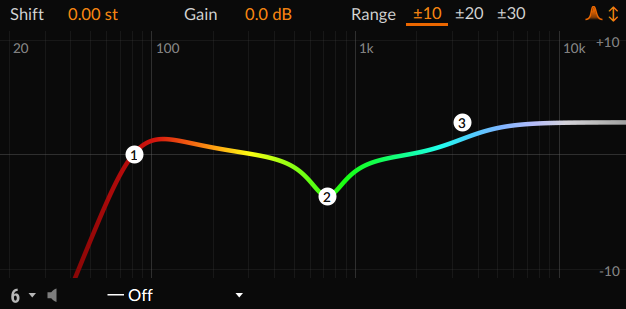
EQ: This has 3 main focuses (numbered above), not all necessary, depending on your voice, your mic, and your room, but try each one (and vary the values to see how they sound!):
- Cut the low end: Most voices don't have much going on below 100-200hz. But the mic will pick up rumbles, which make the mix sound bad. Cut with a High Pass Filter (HPF) at 200hz. If it makes your voice sound thinner, undo and try again a bit lower.
- Boost the high-end: Use a high shelf filter to boost the high end of your vox to make them a bit brighter/sharper. You don't need much. +2-3db, with a shelf at about 2.5kHz-5kHz. To taste.
- MAYBE: use a notch filter to reduce any dominant frequencies in the mid-range. This requires a lot of trial and error. If you're not sure, don't do it.
-
Dynamics control (to make the volume more consistent)
- Soft gate: turns all the really quiet bits between words down, which can reduce background noise.
- Compressor: Turns everything up, and then turns the loudest bits back down, so that levels are more consistent. You want a very short attack (1ms), and a medium tail (maybe 80-150ms). Threshold around -15 to -20 dB, ratio between 2:1 and 3:1. Makeup gain ON.
-
Reverb: only a TINY bit. Like, turn it down until you just CAN'T tell it's even doing anything. Maybe like 5-10%, depending on the effect you're using. Something like 0.5-1s tail length. Basically this makes the recording sound a little less clinical.
-
Limiter: Kill the spiky volume peaks, without modifying the sound much. This lets you push it a little louder, if you need it. Might be better to put this before the reverb.
Getting over the fear of recording
Some tips:
- Record a video of you doing it, and then watch it a few times. Seeing your own face moving in time with your (weird sounding, out-of-skull) voice helps to normalise it, and make it sound less weird when you listen back next time. Works super well, I went from hating my voice to being OK with it pretty quickly.
- Aim to finish a bad take. After that, do it again. After a few bad takes, a good take will be a lot less daunting.
- I also like to just hit record, and then practice a bunch. Do enough takes of a verse until you get it right without mistakes, and then do a few more times, until you're getting it right every time. Then delete everything (or maybe just keep the best one for reference).
- From @om_gm: "do a few takes as not just bad takes, but silly takes.. Do one like Elle from Legally Blonde, one like Blinky Bill, etc"
If you're struggling with flow, some options: - If you're in a DAW, try slowing the track down by 10%, and practice at that speed until you're nailing it, and then speed it back up. - If you don't have a DAW, @Welbot pointed out that you can use the FL Studio demo for free, including exporting (you just can't save). There are also cheap but sufficient DAWs like Reaper and Ardour. - from @ADG: It can also be useful to record each bar individually, and then splice them together, and then re-record along side that, using it as a guide.